
Task Failed Successfully meme
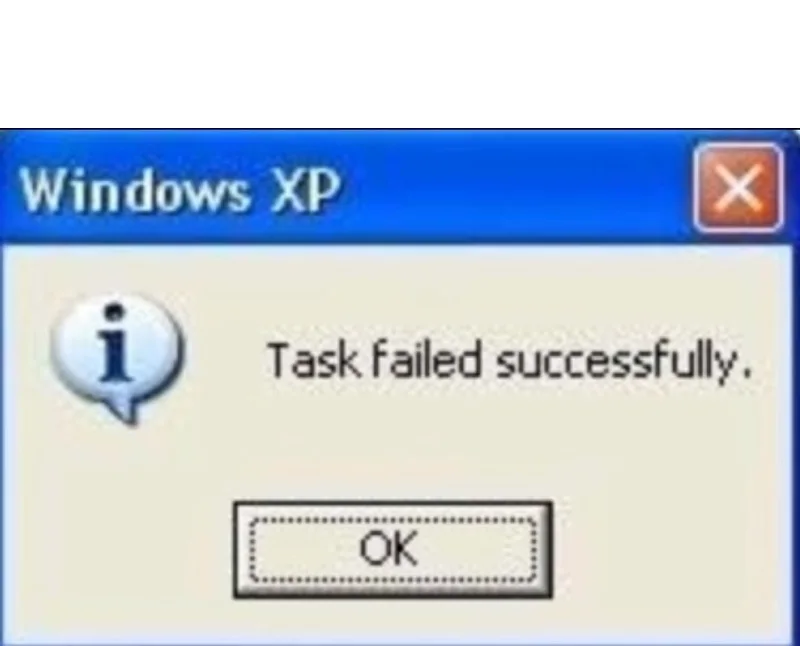
Task Failed Successfully spoofs a classic Windows XP pop-up complete with a tidy blue information icon declaring the glorious contradiction “Task failed successfully.” People use it whenever a clumsy mistake, missed connection, or completely botched plan accidentally lands an even better outcome than intended.
“Nothing went according to plan, and yet somehow the final outcome is an absolute triumph.”
Caption examples for your group chat
Original Memish examples. Tap “Use these lines” to load one into the meme maker at the top, then make it yours.
Commute luck
MISSING THE LOCAL BUS BY TEN SECONDS
ONLY TO CATCH THE EMPTY EXPRESS ONE
A classic everyday glitch where running slightly late cuts fifteen minutes off your trip.
Accidental gourmet
BURNING THE TOP OF THE CASSEROLE
AND EVERYONE CALLING IT CRISPY PERFECTION
Never admit the timer broke—just accept the compliments and click OK.
Wrong-turn shortcut
TAKING A COMPLETELY WRONG TURN
AND FINDING FRONT-ROW FREE PARKING
Navigation completely fell apart, yet the final destination could not have gone better.
What does it mean?
Anyone who remembers retro desktop software knows the uncanny joy of bizarre system boxes that solemnly announce an operation succeeded inside a failure alert. Online, that glitchy logic evolved into the ultimate celebration of failing upward—missing the slow local bus only to hop straight onto an empty express, or forgetting an ingredient and discovering your best recipe yet.
To make the caption pop, make sure both halves of the paradox are clear in the white top header: line one shows what went wrong, and line two delivers the unexpected victory that turned a blunder into a win.
How the format works
3 beats to nail the punchline
- 1Beat 01
Choose an everyday blunder, typo, or missed step that accidentally worked out in your favor.
- 2Beat 02
Put the botched attempt on line one and the surprise payoff on line two inside the white top header.
- 3Beat 03
Leave the Windows XP information icon, paradoxical message, and OK button clear below to deliver the deadpan tech verdict.
When to drop it in the chat
Green light
Send it when
Post it when missing a slow train lands you on a faster express, when accidentally over-toasting dinner earns rave reviews for “caramelized crispiness,” or when a chaotic wrong turn leads straight to an open parking spot.
Plot twist
When another reaction fits
Skip it if the mishap genuinely just failed with zero silver lining—Bad Luck Brian or Press F to Pay Respects fits pure misfortune better. For a clean everyday triumph with no accidental glitch involved, Success Kid is the classic pick.
Where did it come from?
Despite its convincing gray-and-blue Windows XP styling, Microsoft never shipped a literal “Task failed successfully” alert—though real Windows APIs occasionally surfaced contradictory messages like “Operation completed successfully” inside error boxes. Know Your Meme groups the dialog within the mid-2000s wave of parody “Funny Error Messages” popularized by custom Windows XP dialog generators (such as Atom Smasher’s Error Message Generator, launched in 2005) and VBScript jokes; original creator unverified. The standalone macro surged across Reddit, Twitter, and programmer communities in 2018–2020 as shorthand for failing upward. The captions here are original Memish examples.
Task Failed Successfully: Windows XP parody dialog and reaction spread on Know Your Meme
knowyourmeme.com
Funny Error Messages: mid-2000s Windows error generator history on Know Your Meme
knowyourmeme.com
Image credit: Parody Windows XP error dialog (Microsoft UI aesthetic), original creator unverified; archived by Know Your Meme; caption space added by Memish.
Find the right reaction
Browse all 269 memes →
Stonks
For mock-corporate pride in questionable decisions that somehow yield absurd wins.
“My financial logic is deeply questionable, yet the imaginary chart is going straight up.”

Success Kid
For celebrating a straightforward small win without any accidental blunder.
“A win is a win. Please assemble the parade.”

Modern Problems Require Modern Solutions
For deliberately inventing a scrappy workaround rather than stumbling into success.
“My fix is slightly chaotic and deeply unofficial, which clearly makes it visionary engineering.”
More Winning memes
Same vibe · keep clicking


Need something ready to send right now?